



































Brookhaven
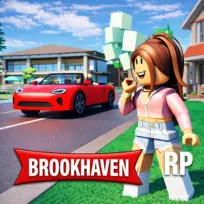
Brookhaven is a browser-based game in the 3D simulation genre that focuses on open-ended roleplaying in a modern town environment. Players control a customizable character and freely explore locations such as houses, schools, hospitals, and city streets. The game encourages self-directed play by allowing players to choose roles, interact with objects, and create everyday scenarios without fixed objectives. Players move between public spaces and private homes, use vehicles to travel, and switch outfits to match different roles. Progression comes from experimentation rather than levels, as players continuously shape new situations through interaction and imagination. Social interaction plays a central role, with multiple players sharing the same space and participating in cooperative or parallel roleplay. Brookhaven emphasizes freedom, routine activities, and player-driven storytelling similar to games like Animal Crossing.
Developer / Release Date
Developed by: Voldex
Release Date: April 21, 2020
Controls
PC Controls:
-
W = Move Forward
-
S = Move Backward
-
A = Move Left
-
D = Move Right
-
Space = Jump
-
Left Shift = Run
-
Mouse Move = Look Around
-
Left Mouse Button = Select / Click
-
Right Mouse Button = Rotate Camera
-
Mouse Scroll Wheel = Zoom Camera
-
E = Interact / Use Object
-
R = Sit / Stand (when available)
-
1 = Open Backpack
-
2 = Open Avatar Editor
-
3 = Open Vehicle Menu
-
4 = Open House Menu
-
5 = Open Emotes
-
B = Open Backpack (alternate key)
-
M = Open Map
-
Esc = Game Menu
Mobile Controls:
-
Virtual Joystick = Move
-
Swipe Screen = Look Around
-
Tap Jump Button = Jump
-
Tap Run Button = Run
-
Tap Interact Button = Interact / Use Object
-
Tap Backpack Icon = Open Backpack
-
Tap Avatar Icon = Open Avatar Editor
-
Tap Car Icon = Open Vehicle Menu
-
Tap House Icon = Open House Menu
-
Tap Emote Icon = Open Emotes
-
Pinch In / Out = Zoom Camera
-
Tap Map Icon = Open Map
-
Tap Menu Button = Game Menu
How to Play
You start Brookhaven by selecting and customizing your character before entering the town. You control movement, explore buildings, and interact with objects using simple controls. The game does not assign missions or enforce goals, so you decide how to spend your time. You can choose a house, decorate it, and treat it as a home base. You can switch roles by changing outfits, vehicles, or locations, which naturally shifts how you play. If a situation ends or feels repetitive, you immediately start a new one by relocating or changing roles. Failure does not reset progress because the game focuses on continuous play rather than winning or losing. Each session becomes a new loop of exploration, interaction, and roleplay shaped by your choices.
Game Features
-
Open 3D town with accessible buildings and streets
-
Character customization through outfits and avatar tools
-
Drivable vehicles for fast movement across the map
-
Interactive objects that support roleplay scenarios
-
Shared multiplayer environment with other players
-
Flexible gameplay inspired by social simulation games like Animal Crossing
Is Brookhaven Unblocked?
Brookhaven runs directly in the browser, which allows it to load on many school and office networks. The game does not require downloads or special software, reducing common access restrictions. Network filters may vary, but browser-based design improves accessibility during breaks or free time. Quackprep provides a platform where players can access the game without additional setup.
How Can I Play Brookhaven for Free?
You can play Brookhaven for free on Quackprep directly in your web browser.
No downloads, no installations, and no registration are required.
Similar Games
These games share a focus on 3D exploration, simulation elements, and player-driven interaction.